


A display plan is a short list of decisions made before anything reaches a shelf: how much room the model needs, what you will call it, and how much of what you believe about it you can actually back up. Those decisions are cheap on paper and expensive to redo once a finished build is already sitting somewhere awkward. Here is how the GETBLASTER editorial team approaches planning a display for the M24 SWS brick-built model, including where our documentation stops and your own measuring starts.
For a neutral catalog view, View the declared product details.
Where display plans usually go sideways
Most display problems are not build problems. The model goes together fine, then lands on whatever surface was closest when the last piece went on. The shelf turns out too shallow, or the model faces a wall, or it sits where a passing elbow will find it. That is a planning gap, and it shows up in the same three places nearly every time: space, orientation, and handling.
There is a fourth gap that is harder to undo: the label. A display is a small act of record-keeping. Whatever you write on the shelf card becomes what the household believes six months later. Getting the name right at the start costs a minute; getting it wrong propagates quietly.
What the M24 SWS name is doing here
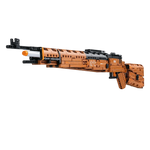
On a shelf, a name is a promise about which model you are looking at. The declared product title for this set is Apex Brickblaster Sniper — 1,388-Piece Building Set, and M24/SWS is the model identity carried with it. That identity is what belongs on your label, because it is what people will use to tell the build apart from anything else on the shelf.
One identity rule is worth stating plainly, and it is the one our sources support directly: keep M24/SWS distinct from Kar98. They are separate model identities and should stay separate on the shelf card, in a photo caption, and in any personal inventory you keep. Merging them is an easy slip, and every note you write afterwards inherits the error. If you write one thing on your planning page before you start, write the model identity, on its own.
What we checked before writing this
Two documents sit behind this article. The first is the Apex Brickblaster Sniper product page, read as the canonical listing for this model. We treat it the way you should: as the current state of what is offered under that name. The declared title and the model identity come from there and nowhere else. When we quote that title, we are quoting a listing, not reporting something we counted.
The second is the wider GetBlaster brick-built product collection, which shows where this model sits among its neighbors. That context matters, because it is how you learn whether you are placing one model or eventually a row of them — and a row changes your spacing arithmetic. What collection context does not do is authorize specifications. If a dimension, a material, or a display footprint is not listed, browsing a collection page does not supply it, and neither will we.
Where our evidence stops
We did not build this model, measure it, weigh it, photograph it on a shelf, or time the assembly. So this article has nothing to tell you about assembled size, footprint, weight, stability, or materials. Those are precisely the numbers a display plan wants, which is why we are flagging their absence up front instead of filling the space with confident-sounding guesses.
It is worth being precise about what an absence means. If a detail is not in our sources, that is a statement about our sources, not about the model. It does not make the detail unknowable; it means we are not the authority for it. The practical version: plan with placeholders wherever we are silent, then confirm each placeholder against the declared product details before you commit to a surface or a case. Labeled placeholders survive contact with a tape measure; borrowed assumptions usually do not.
A planning pass you can run with a tape measure
Here is the sequence we would run, in order, before any building starts.
- Pick the surface first. Choose the specific shelf, case, or table, then write down its usable depth, width, and height from a tape measure rather than memory.
- Reserve clearance, not just footprint. You need room to set the model down, lift it out again, and get a hand behind it — always more than the outline it occupies.
- Write the label before the build. Put the model identity on the card first, keeping M24/SWS separate from Kar98.
- Decide the viewing line. Stand where people actually stand in the room and choose the face that should point at them.
- Plan the handling, not only the placement. Decide now how the model will be lifted, dusted, and moved, and whether your chosen surface makes any of that awkward.
- Account for everyone else in the room. If young children or pets share the space, let that shape where the model sits and how it is handled, and keep handling supervised.
- Write down what you are still guessing. Anything you could not measure or confirm goes on a short list to check against the declared product details.
Reading a declaration without over-reading it
A product listing is a declaration: a statement of what is being offered under a given name. That is useful information, and it is different from an independent measurement. The piece descriptor inside the title is part of the declared name, not something we verified by counting. Plan around it, and check the live listing when a decision depends on a specific detail. Declarations tell you what a thing is called; tape measures tell you whether it fits.
Where the product page fits in the plan
This model has its own canonical product page in the GetBlaster catalog, separate from every other model listed there. That page is where the declared details live, and it is the reference point for checking your placeholders. Whether this set suits your room, your shelf, or your household is your call, made against your own measurements.
Questions to answer before it goes up
- Does the surface still work once clearance is added, or only on paper?
- Who else handles it, and does the chosen height match that answer?
- What exactly does the label say, and is the model identity kept distinct?
- Which of my numbers are measured, and which are still assumptions?
- If the model has to move, what is the plan?
When you want to review the catalog context, Explore the product-page declarations.
Sources
- Apex Brickblaster Sniper product page — canonical listing and current product details for this model.
- GetBlaster brick-built product collection — collection context, which does not authorize unlisted specifications.

Review the product details
Apex Brickblaster Sniper — 1,388-Piece Building Set
Review the declared product details and build context on the product page before deciding what to explore next.
View Apex Brickblaster Sniper — 1,388-Piece Building Set details